
Building a Production-Ready REST API with Node.js, PostgreSQL & Prisma
A comprehensive architectural guide to building production Node.js backends: layer separation, Prisma ORM, PostgreSQL database design, JWT auth, input validation, and security.

Yash Nandvana
Full Stack Developer
1. Introduction
There is a vast difference between "an API that works on localhost" and "an API that is ready for production."
Creating basic CRUD routes in Express:
GET /users
POST /users
GET /products
can be accomplished in fewer than 50 lines of code.
However, when deploying a backend for a modern SaaS application or multi-tenant web client, your API must reliably handle production concerns:
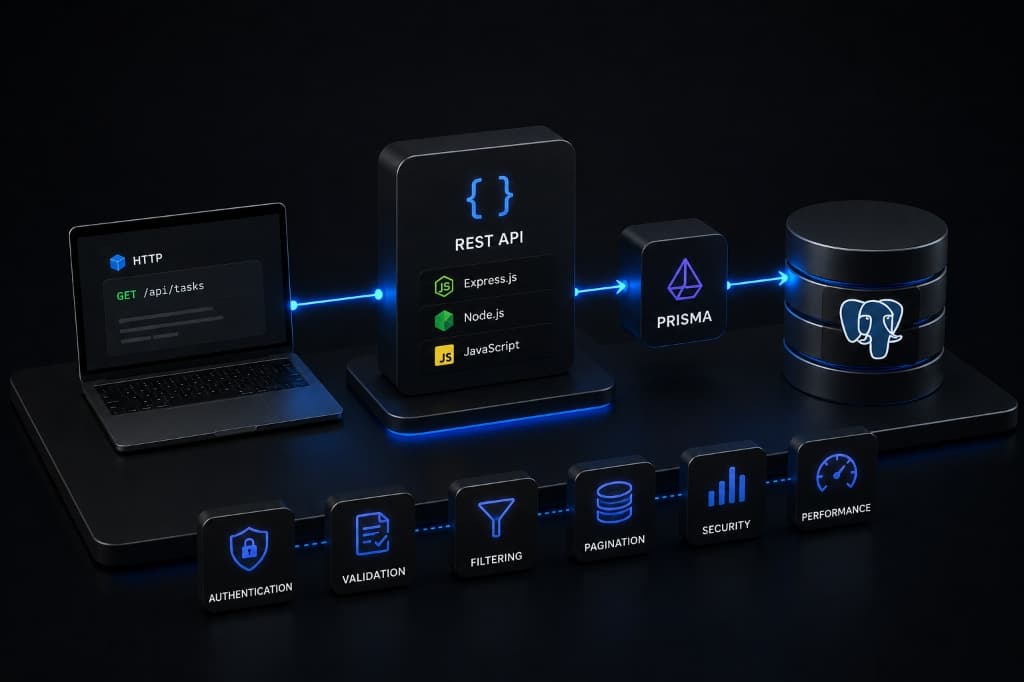
In this guide, we will step through architecting a production-ready REST API using Node.js, Express, PostgreSQL, and Prisma ORM.
2. What We Are Building
We will design a production backend architecture for a Task Management API.
Core Features
High-Level Architecture Flow
┌─────────────────┐       HTTP Requests        ┌────────────────────────┐
│  Client / UI    │ ─────────────────────────> │   Express REST Router  │
└─────────────────┘                            └────────────────────────┘
         ▲                                                 │
         │                                                 │ Controller Layer
         └──────────────── JSON Responses ─────────────────┤
                                                           ▼
                                               ┌────────────────────────┐
                                               │     Service Layer      │
                                               │    (Business Logic)    │
                                               └────────────────────────┘
                                                           │
                                                           ▼
┌─────────────────┐     Relational Queries     ┌────────────────────────┐
│   PostgreSQL    │ <───────────────────────── │       Prisma ORM       │
└─────────────────┘                            └────────────────────────┘
3. Project Architecture & Directory Structure
To keep the application maintainable as features expand, we enforce strict separation of concerns across a clean layer hierarchy:
src/
├── controllers/      # HTTP Request & Response Handlers
│   ├── authController.js
│   └── taskController.js
├── routes/           # Express Endpoint Route Definitions
│   ├── authRoutes.js
│   └── taskRoutes.js
├── services/         # Business Logic & Prisma Operations
│   ├── authService.js
│   └── taskService.js
├── middleware/       # Auth, Validation & Error Middlewares
│   ├── authenticate.js
│   ├── validate.js
│   └── errorHandler.js
├── validators/       # Input Validation Schemas
│   ├── authValidator.js
│   └── taskValidator.js
├── lib/              # Prisma Client Singleton Instance
│   └── prisma.js
├── app.js            # Express App Configuration
└── server.js         # HTTP Server Entrypoint

prisma/
└── schema.prisma     # Relational Models & Indexes
Layer Responsibilities
4. Setting Up Node.js and Express
We initialize the project using modern ES Modules ("type": "module" in package.json).
package.json Configuration
{
  "name": "production-node-api",
  "version": "1.0.0",
  "type": "module",
  "main": "src/server.js",
  "scripts": {
    "dev": "node --watch src/server.js",
    "start": "node src/server.js",
    "prisma:generate": "prisma generate",
    "prisma:migrate": "prisma migrate dev"
  },
  "dependencies": {
    "@prisma/client": "^6.3.0",
    "bcryptjs": "^2.4.3",
    "cors": "^2.8.5",
    "dotenv": "^16.4.7",
    "express": "^4.21.2",
    "helmet": "^8.0.0",
    "jsonwebtoken": "^9.0.2",
    "zod": "^3.24.1"
  },
  "devDependencies": {
    "prisma": "^6.3.0"
  }
}
5. Connecting PostgreSQL
PostgreSQL is the industry standard open-source relational database for SaaS applications due to its ACID compliance, rich query planner, strong data types, and index performance.
Environment Variable Security
Store your PostgreSQL connection string in a .env file. Never hardcode database credentials in your codebase.
# .env
PORT=5000
NODE_ENV=development
DATABASE_URL="postgresql://postgres:secretpassword@localhost:5432/taskdb?schema=public"
JWT_SECRET="super-secret-jwt-key-change-in-production-32-chars"
6. Prisma Setup & Singleton Instance
Prisma is a modern TypeScript/JavaScript ORM that provides a type-safe database client and declarative schema migrations.
Prisma Client Singleton (src/lib/prisma.js)
In development environments with hot-reloading, instantiating multiple PrismaClient objects can exhaust PostgreSQL connection limits. We enforce a single client instance:
// src/lib/prisma.js
import { PrismaClient } from "@prisma/client";

const globalForPrisma = globalThis;

export const prisma =
  globalForPrisma.prisma ||
  new PrismaClient({
    log: process.env.NODE_ENV === "development" ? ["query", "error", "warn"] : ["error"],
  });

if (process.env.NODE_ENV !== "production") {
  globalForPrisma.prisma = prisma;
}
7. Database Design & Schema Modeling
Open prisma/schema.prisma to define our relational data models:
// prisma/schema.prisma
datasource db {
  provider = "postgresql"
  url      = env("DATABASE_URL")
}

generator client {
  provider = "prisma-client-js"
}

enum TaskStatus {
  PENDING
  IN_PROGRESS
  COMPLETED
}

model User {
  id        String   @id @default(cuid())
  email     String   @unique
  name      String
  password  String
  createdAt DateTime @default(now())
  updatedAt DateTime @updatedAt
  tasks     Task[]

  @@map("users")
}

model Task {
  id          String     @id @default(cuid())
  title       String
  description String?
  status      TaskStatus @default(PENDING)
  userId      String
  user        User       @relation(fields: [userId], references: [id], onDelete: Cascade)
  createdAt   DateTime   @default(now())
  updatedAt   DateTime   @updatedAt

  @@index([userId, status])
  @@index([createdAt(sort: Desc)])
  @@map("tasks")
}
Architectural Database Decisions
@id @default(cuid()): Generates collision-resistant, URL-safe string primary keys instead of predictable sequential integers (1, 2, 3).@unique on User Email: Enforces database-level uniqueness to prevent duplicate user account registrations.onDelete: Cascade: Ensures that if a user deletes their account, their associated tasks are automatically purged.@@index([userId, status]): Dramatically speeds up database queries that filter a specific user's tasks by status.8. Prisma Migrations
Execute your first migration to create the underlying PostgreSQL tables:
npx prisma migrate dev --name init_users_and_tasksDev vs Production Migrations
npx prisma migrate dev creates new SQL migration files and updates local databases.npx prisma migrate deploy applies pending version-controlled migrations safely during CI/CD deployments.9. Building REST API Routes
Our API exposes standardized RESTful endpoints:
| Method | Endpoint | Description | Auth Required | |
|---|---|---|---|---|
| POST | /api/auth/register | Register a new user account | No | |
| POST | /api/auth/login | Authenticate & return JWT token | No | |
| GET | /api/tasks | List user's tasks (Paginated) | Yes | |
| GET | /api/tasks/:id | Fetch a single task by ID | Yes | |
| POST | /api/tasks | Create a new task | Yes | |
| PATCH | /api/tasks/:id | Update an existing task | Yes | |
| DELETE | /api/tasks/:id | Delete a task | Yes |
10. Controller vs Service Layer
To avoid monolithic 300-line controller files, we separate HTTP concerns from domain business logic.
Service Layer (src/services/taskService.js)
// src/services/taskService.js
import { prisma } from "../lib/prisma.js";

export async function getUserTasks({ userId, page = 1, limit = 10, status }) {
  const skip = (page - 1) * limit;

  const where = {
    userId,
    ...(status && { status }),
  };

  const [tasks, total] = await Promise.all([
    prisma.task.findMany({
      where,
      skip,
      take: limit,
      orderBy: { createdAt: "desc" },
    }),
    prisma.task.count({ where }),
  ]);

  return {
    tasks,
    pagination: {
      page: Number(page),
      limit: Number(limit),
      total,
      totalPages: Math.ceil(total / limit),
    },
  };
}

export async function createNewTask({ userId, title, description, status }) {
  return prisma.task.create({
    data: {
      userId,
      title,
      description,
      ...(status && { status }),
    },
  });
}
Controller Layer (src/controllers/taskController.js)
// src/controllers/taskController.js
import * as taskService from "../services/taskService.js";

export async function getTasks(req, res, next) {
  try {
    const { page, limit, status } = req.query;
    const result = await taskService.getUserTasks({
      userId: req.user.id,
      page,
      limit,
      status,
    });

    res.status(200).json({
      success: true,
      data: result.tasks,
      pagination: result.pagination,
    });
  } catch (error) {
    next(error);
  }
}

export async function createTask(req, res, next) {
  try {
    const task = await taskService.createNewTask({
      userId: req.user.id,
      ...req.body,
    });

    res.status(201).json({
      success: true,
      data: task,
    });
  } catch (error) {
    next(error);
  }
}
11. Input Validation with Zod
Never trust raw incoming request bodies. We use Zod to validate types, string lengths, emails, and enums before requests reach controllers.
// src/validators/authValidator.js
import { z } from "zod";

export const registerSchema = z.object({
  name: z.string().min(2, "Name must be at least 2 characters"),
  email: z.string().email("Invalid email address"),
  password: z.string().min(8, "Password must be at least 8 characters"),
});

export const loginSchema = z.object({
  email: z.string().email("Invalid email address"),
  password: z.string().min(1, "Password is required"),
});
Validation Middleware (src/middleware/validate.js)
// src/middleware/validate.js
export function validate(schema) {
  return (req, res, next) => {
    const result = schema.safeParse(req.body);
    if (!result.success) {
      const errors = result.error.errors.map((err) => ({
        field: err.path.join("."),
        message: err.message,
      }));
      return res.status(400).json({
        success: false,
        message: "Validation Error",
        errors,
      });
    }
    req.body = result.data;
    next();
  };
}
12. Authentication with JWT & Password Hashing
Never store plain-text passwords. We hash passwords using bcryptjs with a cost factor of 10 during registration.
Auth Middleware (src/middleware/authenticate.js)
// src/middleware/authenticate.js
import jwt from "jsonwebtoken";

export function authenticate(req, res, next) {
  const authHeader = req.headers.authorization;

  if (!authHeader || !authHeader.startsWith("Bearer ")) {
    return res.status(401).json({
      success: false,
      message: "Authentication token missing or invalid",
    });
  }

  const token = authHeader.split(" ")[1];

  try {
    const decoded = jwt.verify(token, process.env.JWT_SECRET);
    req.user = { id: decoded.userId, email: decoded.email };
    next();
  } catch (error) {
    return res.status(401).json({
      success: false,
      message: "Invalid or expired token",
    });
  }
}
13. Authorization & Record Ownership Checks
Authentication answers "Who are you?" Authorization answers "What are you allowed to do?"
When updating or deleting a task, verifying that a task exists is insufficient—we must verify that the task belongs to the authenticated user:
// src/services/taskService.js
export async function updateTask({ taskId, userId, updateData }) {
  const existingTask = await prisma.task.findUnique({
    where: { id: taskId },
  });

  if (!existingTask) {
    const error = new Error("Task not found");
    error.statusCode = 404;
    throw error;
  }

  // Authorization Check
  if (existingTask.userId !== userId) {
    const error = new Error("Forbidden: You do not own this task");
    error.statusCode = 403;
    throw error;
  }

  return prisma.task.update({
    where: { id: taskId },
    data: updateData,
  });
}
14. Centralized Error Handling Middleware
Avoid cluttering controllers with repetitive try/catch logic. We pass uncaught errors to a single Express error middleware:
// src/middleware/errorHandler.js
export function errorHandler(err, req, res, next) {
  console.error(`[Error] ${req.method} ${req.url}:`, err);

  const statusCode = err.statusCode || 500;
  const message = err.message || "Internal Server Error";

  res.status(statusCode).json({
    success: false,
    message,
    ...(process.env.NODE_ENV === "development" && { stack: err.stack }),
  });
}
15. Standardized HTTP Status Codes
| Status Code | Meaning | Common Usage | |
|---|---|---|---|
| 200 OK | Success | Successful GET, PATCH, or DELETE requests. | |
| 201 Created | Resource Created | Successful POST registration or resource creation. | |
| 400 Bad Request | Invalid Input | Validation failures or missing payload parameters. | |
| 401 Unauthorized | Unauthenticated | Missing or expired JWT token. | |
| 403 Forbidden | Access Denied | Authenticated user lacks ownership permissions. | |
| 404 Not Found | Resource Missing | Invalid record ID or route path. | |
| 409 Conflict | Resource Duplicate | Email address already registered. | |
| 500 Server Error | Unexpected Crash | Database disconnection or server exception. |
16. Pagination, Filtering & Sorting
Never return un-paginated database arrays. Returning 10,000 tasks in a single response leads to memory spikes and network latency.
// Query Example: GET /api/tasks?page=1&limit=20&status=IN_PROGRESS
const page = Math.max(1, parseInt(req.query.page, 10) || 1);
const limit = Math.min(100, Math.max(1, parseInt(req.query.limit, 10) || 20));
17. Security Best Practices
X-Content-Type-Options, X-Frame-Options, Strict-Transport-Security).express-rate-limit.18. Testing Strategy
A production API requires automated testing across 3 layers:
19. Production Checklist
20. Conclusion
Building a production-ready REST API requires going beyond basic routing. By enforcing layer separation, strict relational schema design, input validation, JWT authentication, and record authorization, you build a backend that scales gracefully.
Next Recommended Reads
Yash Nandvana• Full Stack Developer
Full Stack & Shopify Developer building scalable web apps, developer tools, and AI solutions.
Learn more about YashRelated Articles
Shopify Webhooks: A Complete Guide for Developers
A comprehensive, production-tested guide to Shopify webhooks: HMAC signature verification, raw body handling, idempotency with Redis, queue architecture, and local testing.
Shopify GraphQL Admin API: A Practical Guide for Developers
A comprehensive, production-oriented guide to Shopify's GraphQL Admin API: queries, mutations, pagination, rate limit cost calculation, userErrors checking, and bulk operations.
AI Coding Agents in 2026: How Developers Actually Use Claude Code, Codex & Copilot
A practical engineering guide to AI coding agents in 2026 — how they differ from autocomplete, how to use Claude Code, Codex, and GitHub Copilot in real workflows, and why human supervision still matters.