
PostgreSQL + pgvector: Building Semantic Search and RAG Without a Separate Vector Database
A complete, practical tutorial for adding semantic search, hybrid search, and RAG to an existing PostgreSQL application using pgvector — covering embeddings, HNSW, metadata filtering, Reciprocal Rank Fusion, and background embedding pipelines.

Yash Nandvana
Full Stack Developer
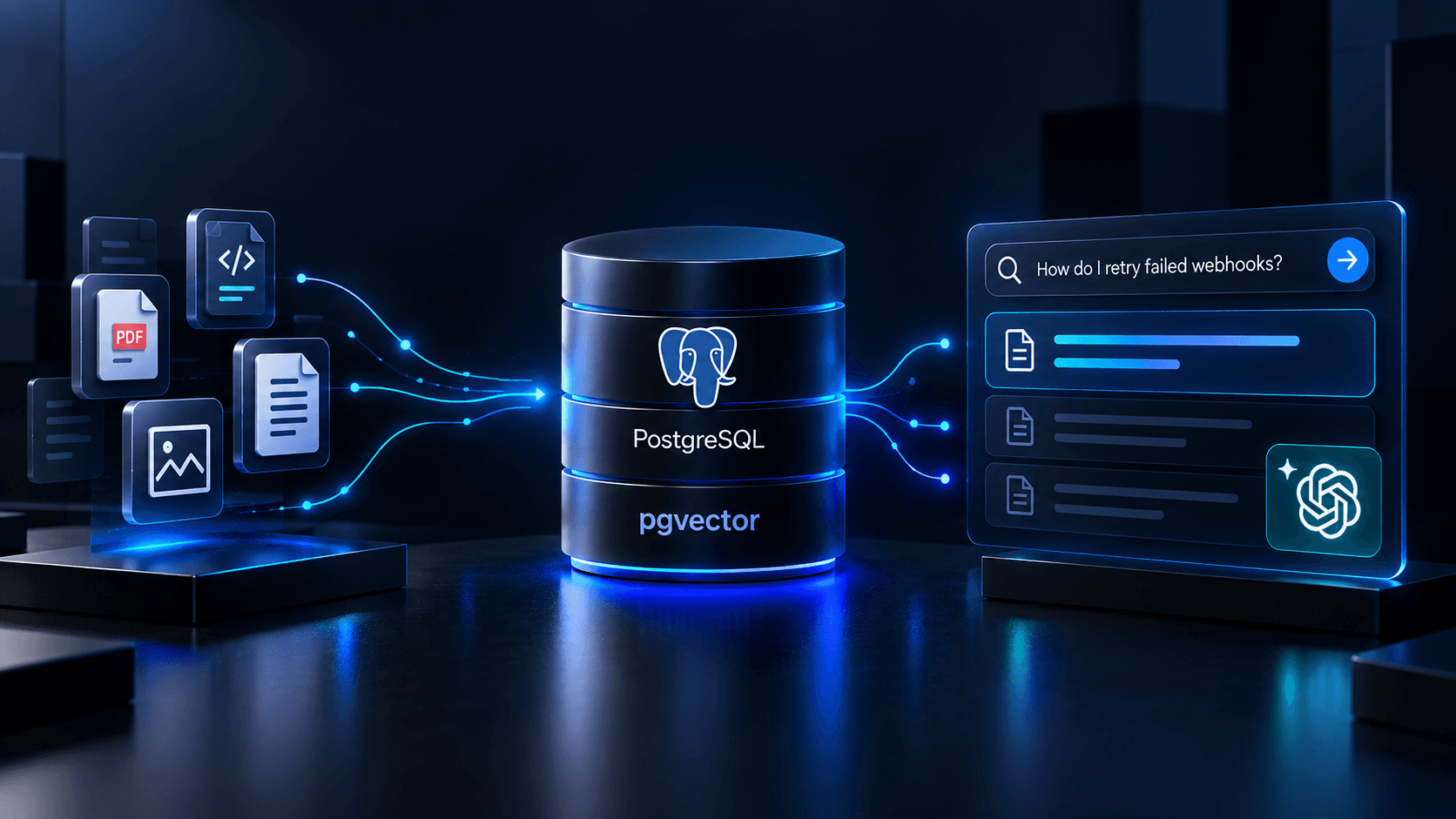
The Actual Problem
You already have thousands of technical documents in PostgreSQL.
Product asks: "Can users search these documents using natural language?"
The obvious answer is: add a vector database. Spin up Pinecone, Weaviate, or Qdrant alongside your existing PostgreSQL.
But that means two databases to maintain, two schemas to keep in sync, two sets of backups, two connection pools, two sources of truth. Every document update must propagate to both systems. Multi-tenancy becomes a distributed data problem. The operational complexity compounds quickly.
The question worth asking first is: does your workload actually need a dedicated vector database?
For most SaaS applications — especially those with existing PostgreSQL infrastructure, moderate vector workloads, and strong relational filtering requirements — pgvector inside PostgreSQL is a practical and operationally simpler path.
This article is a complete practical tutorial. By the end, you will have built:
The Starting Point
We have a SaaS application that stores technical documentation. Users currently search with keyword queries.
The schema:
CREATE TABLE documents (
    id          BIGSERIAL PRIMARY KEY,
    title       TEXT NOT NULL,
    content     TEXT NOT NULL,
    category    TEXT,
    author_id   BIGINT,
    tenant_id   BIGINT NOT NULL,
    created_at  TIMESTAMPTZ DEFAULT NOW(),
    updated_at  TIMESTAMPTZ DEFAULT NOW()
);
Sample data we'll work with throughout:
INSERT INTO documents (title, content, category, author_id, tenant_id) VALUES
('Shopify Webhooks Guide',
 'Shopify sends webhook events to your endpoint whenever specific events occur in a store. To ensure delivery reliability, implement exponential backoff when webhook delivery fails. Verify HMAC signatures on every incoming request using the X-Shopify-Hmac-Sha256 header.',
 'shopify', 1, 1),
('Node.js API Guide',
 'Building REST APIs with Node.js requires handling async errors properly. Use middleware to catch unhandled promise rejections. Implement request validation before business logic.',
 'backend', 1, 1),
('PostgreSQL Transactions Guide',
 'ACID transactions guarantee data integrity. Use BEGIN, COMMIT, and ROLLBACK to wrap operations that must succeed or fail together. Avoid long-running transactions to prevent lock contention.',
 'database', 1, 1),
('Redis Caching Guide',
 'Cache frequently accessed data with appropriate TTL values. Use cache-aside pattern to avoid cache stampede. Invalidate cache entries when underlying data changes.',
 'infrastructure', 1, 1),
('API Security Guide',
 'Protect API endpoints with authentication and authorization. Use JWT tokens with short expiry and refresh token rotation. Rate limiting prevents abuse and protects backend resources.',
 'security', 1, 1);
The current search implementation:
-- Current keyword search
SELECT id, title, category
FROM documents
WHERE tenant_id = $1
  AND (title ILIKE '%' || $2 || '%' OR content ILIKE '%' || $2 || '%')
ORDER BY updated_at DESC;
This works until users start asking natural language questions:
| User query | Document contains | Match? | |
|---|---|---|---|
| "retry failed webhooks" | "exponential backoff for delivery failures" | ❌ ILIKE misses it | |
| "prevent API abuse" | "rate limiting protects backend resources" | ❌ ILIKE misses it | |
| "database consistency" | "ACID transactions guarantee data integrity" | ❌ ILIKE misses it |
The gap is vocabulary mismatch — the user's words and the document's words are different, even though the meaning is the same.
Why Keyword Search Has Limits (And What FTS Does)
Before adding vectors, it is worth understanding what PostgreSQL's full-text search (FTS) actually does — because it is more capable than plain ILIKE, and it belongs in your hybrid search stack.
PostgreSQL FTS tokenizes text, applies stemming (so "failing" matches "fail" and "failed"), removes stop words, and produces a tsvector representation that can be indexed with a GIN index and queried using tsquery.
-- What FTS sees:
SELECT to_tsvector('english', 'Use exponential backoff when webhook delivery fails');
-- Result: 'backoff':3 'deliveri':6 'exponenti':2 'fail':7 'use':1 'webhook':5
A query for "retry failed webhooks" produces:
SELECT to_tsquery('english', 'retry & failed & webhook');
-- Result: 'retri' & 'fail' & 'webhook'
FTS would match "fails" and "webhook" here, but not the conceptual relationship to "exponential backoff". Full-text search operates on vocabulary. Semantic search operates on meaning.
Both serve different retrieval needs. We will use both.
What Is an Embedding?
An embedding is a dense numeric vector that represents the meaning of a piece of text.
"How do I retry failed webhook requests?"
        ↓
  Embedding Model
        ↓
[0.0231, -0.1847, 0.4421, 0.0089, -0.3201, ...]
  (1,536 dimensions for text-embedding-3-small)
The key property: texts with similar meaning produce vectors that are geometrically close to each other in high-dimensional space.
Cosine distance measures the angle between two vectors. When it is near 0, the vectors point in similar directions — semantically similar content. When it is near 1, the content is dissimilar.
Two things worth understanding about dimensions:
text-embedding-3-small. The model determines the dimensionality — you cannot change it without re-generating all embeddings with a different model.OpenAI's text-embedding-3-small is the model we'll use. It produces 1,536-dimensional vectors (or fewer if you use the dimensions parameter to truncate) and offers a good balance of quality and cost. The SDK call:
import OpenAI from 'openai';

const openai = new OpenAI({ apiKey: process.env.OPENAI_API_KEY });

async function generateEmbedding(text) {
  const response = await openai.embeddings.create({
    model: 'text-embedding-3-small',
    input: text,
    encoding_format: 'float',
  });
  return response.data[0].embedding; // float[]
}
This is verified against the current OpenAI Node.js SDK (openai npm package). The method is openai.embeddings.create, the response shape is response.data[0].embedding.
Why pgvector?
pgvector is a PostgreSQL extension that adds:
vector column type<-> (L2), <=> (cosine), <#> (inner product), <+> (L1)Architecture with pgvector:
PostgreSQL
├── users
├── documents         (relational data)
├── document_chunks   (chunks + embeddings)
└── All in one database
Why this works well for existing PostgreSQL applications:
When a dedicated vector database might make sense:
Do not frame this as "pgvector vs. Pinecone". Frame it as: does my workload fit inside PostgreSQL? For most SaaS applications with moderate vector needs, the answer is yes.
Install pgvector
The fastest way to get PostgreSQL with pgvector for local development is Docker:
# docker-compose.yml
version: '3.8'
services:
  postgres:
    image: pgvector/pgvector:pg17
    environment:
      POSTGRES_USER: postgres
      POSTGRES_PASSWORD: postgres
      POSTGRES_DB: docsearch
    ports:
      - '5432:5432'
    volumes:
      - pgdata:/var/lib/postgresql/data

volumes:
  pgdata:
Start it:
docker-compose up -dThen enable the extension in your database (once per database):
CREATE EXTENSION IF NOT EXISTS vector;Verify it is installed:
SELECT * FROM pg_extension WHERE extname = 'vector';The pgvector image tags follow the pattern pgvector/pgvector:pg17 for PostgreSQL 17 with pgvector pre-installed. As of this writing, pgvector 0.8.x supports PostgreSQL 13 through 18.
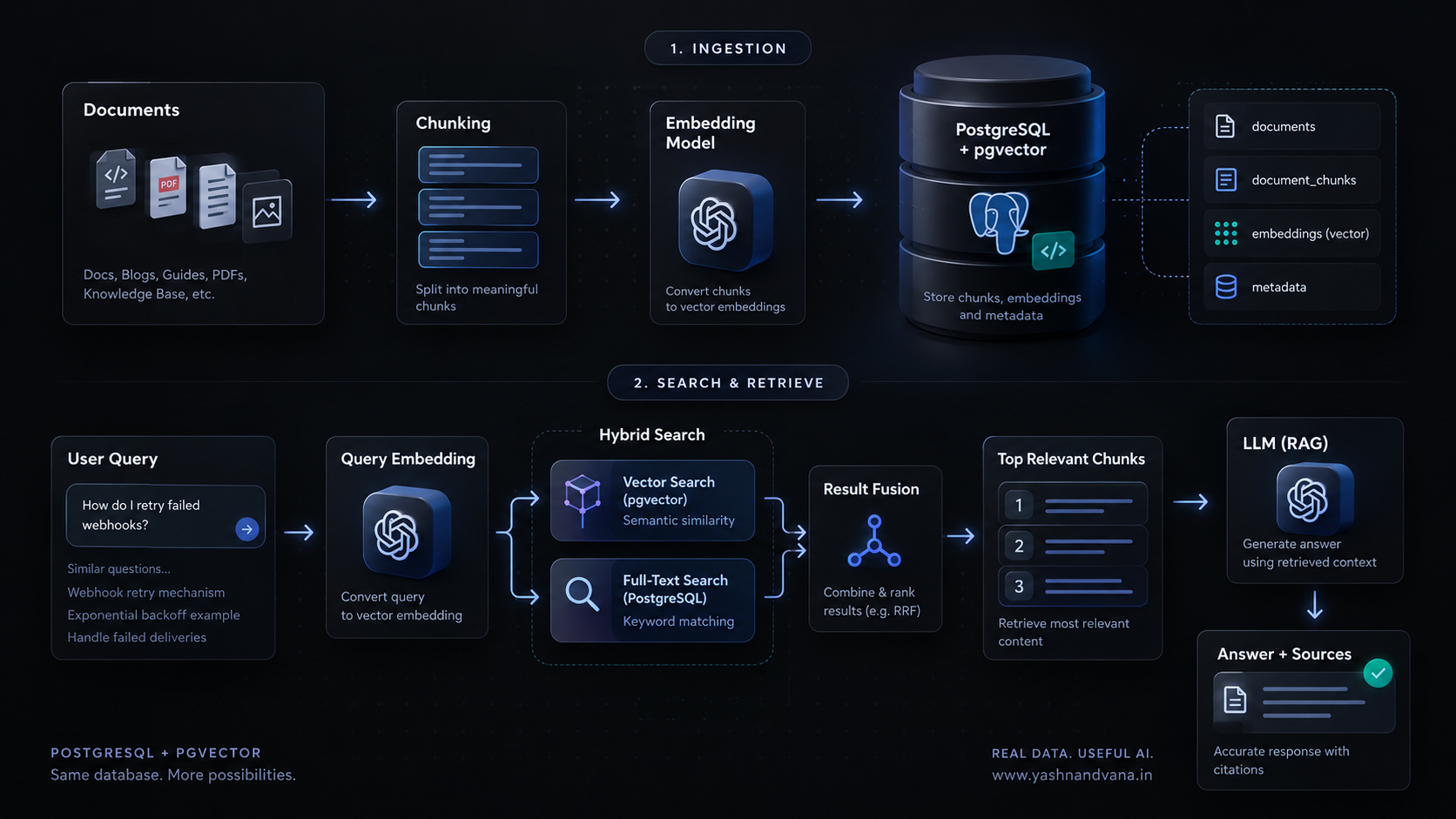
Database Design: Documents and Chunks
A common mistake is adding a single embedding column directly to the documents table.
Why that is wrong:
A 30-page technical guide produces one embedding for the entire document. That embedding blurs together everything in the guide. When a user asks a specific question, the embedding of the whole document is a poor match for the embedding of that specific question, even if the answer is in the document.
The right approach is chunking:
Document: "Shopify Webhooks Guide" (2,000 words)
    ├── Chunk 1: Introduction + What are webhooks (chunk_index: 0)
    ├── Chunk 2: HMAC signature verification (chunk_index: 1)
    ├── Chunk 3: Retry logic and exponential backoff (chunk_index: 2)
    └── Chunk 4: Testing with ngrok and CLI (chunk_index: 3)
Each chunk gets its own embedding. Retrieval finds the specific chunk that answers the specific question.
Schema:
CREATE EXTENSION IF NOT EXISTS vector;

CREATE TABLE documents (
    id              BIGSERIAL PRIMARY KEY,
    title           TEXT NOT NULL,
    content         TEXT NOT NULL,
    category        TEXT,
    author_id       BIGINT,
    tenant_id       BIGINT NOT NULL,
    content_hash    TEXT,          -- For detecting content changes
    created_at      TIMESTAMPTZ DEFAULT NOW(),
    updated_at      TIMESTAMPTZ DEFAULT NOW()
);

CREATE TABLE document_chunks (
    id              BIGSERIAL PRIMARY KEY,
    document_id     BIGINT NOT NULL REFERENCES documents(id) ON DELETE CASCADE,
    chunk_index     INTEGER NOT NULL,
    content         TEXT NOT NULL,
    metadata        JSONB DEFAULT '{}',
    embedding       vector(1536),   -- text-embedding-3-small dimensions
    embedding_model TEXT,           -- Track which model generated this
    created_at      TIMESTAMPTZ DEFAULT NOW(),
    updated_at      TIMESTAMPTZ DEFAULT NOW(),
    UNIQUE(document_id, chunk_index)
);

-- Standard relational indexes
CREATE INDEX idx_document_chunks_document_id ON document_chunks(document_id);
CREATE INDEX idx_documents_tenant_id ON documents(tenant_id);
CREATE INDEX idx_document_chunks_tenant ON document_chunks(document_id)
    INCLUDE (content, embedding);

-- Composite index for tenant-scoped document filtering
CREATE INDEX idx_documents_tenant_category ON documents(tenant_id, category);
Note the embedding_model column. This matters when you need to migrate to a new embedding model — you need to know which chunks were generated with which model, so you can selectively regenerate them.
Document Chunking
Chunk size is one of the variables that most directly affects retrieval quality. There is no universally correct number. Shorter chunks are more precise but lose surrounding context. Longer chunks provide more context but produce noisier embeddings.
A reasonable starting point for technical documentation: 400–600 tokens per chunk, with 50–100 token overlap between adjacent chunks. Overlap prevents losing information at chunk boundaries.
// src/documents/chunker.js
const CHUNK_SIZE = 500;       // approximate words (not tokens)
const CHUNK_OVERLAP = 75;     // words of overlap between adjacent chunks

/**
 * Splits document content into overlapping chunks.
 * Attempts to split at paragraph boundaries to preserve coherence.
 */
function chunkDocument(document) {
  const { id, title, content, category, tenant_id } = document;

  // Split on paragraph boundaries first
  const paragraphs = content
    .split(/\n{2,}/)
    .map(p => p.trim())
    .filter(p => p.length > 0);

  const chunks = [];
  let currentChunk = [];
  let currentWordCount = 0;
  let chunkIndex = 0;

  for (const paragraph of paragraphs) {
    const words = paragraph.split(/\s+/);

    // If adding this paragraph would exceed chunk size, flush current chunk
    if (currentWordCount + words.length > CHUNK_SIZE && currentChunk.length > 0) {
      const chunkContent = currentChunk.join('\n\n');

      chunks.push({
        document_id: id,
        chunk_index: chunkIndex++,
        content: chunkContent,
        metadata: {
          document_title: title,
          category,
          tenant_id,
          char_count: chunkContent.length,
          word_count: currentWordCount,
        },
      });

      // Carry over last N words as overlap
      const overlapWords = currentChunk
        .join(' ')
        .split(/\s+/)
        .slice(-CHUNK_OVERLAP);

      currentChunk = [overlapWords.join(' ')];
      currentWordCount = overlapWords.length;
    }

    currentChunk.push(paragraph);
    currentWordCount += words.length;
  }

  // Flush the last chunk
  if (currentChunk.length > 0) {
    const chunkContent = currentChunk.join('\n\n');
    chunks.push({
      document_id: id,
      chunk_index: chunkIndex,
      content: chunkContent,
      metadata: {
        document_title: title,
        category,
        tenant_id,
        char_count: chunkContent.length,
        word_count: currentWordCount,
      },
    });
  }

  return chunks;
}

module.exports = { chunkDocument };
Common mistake: Chunking by character count alone without respecting sentence or paragraph boundaries. This produces mid-sentence splits that degrade embedding quality.
Production consideration: Evaluate retrieval quality against your actual content. Technical documentation with code blocks may need a chunking strategy that keeps code blocks intact. If your documents are heavily structured (headings, subheadings), chunk by heading sections rather than by word count.
Generating Embeddings
Before storing vectors, you need to generate them. Here is the embedding service, including batching and retry logic:
// src/embeddings/embeddingService.js
import OpenAI from 'openai';

const openai = new OpenAI({ apiKey: process.env.OPENAI_API_KEY });

const EMBEDDING_MODEL = 'text-embedding-3-small';
const MAX_BATCH_SIZE = 100; // OpenAI allows batching multiple inputs
const MAX_RETRIES = 3;
const INITIAL_RETRY_DELAY_MS = 1000;

/**
 * Generate an embedding for a single text string.
 * Returns a float[] of 1,536 dimensions.
 */
async function generateEmbedding(text) {
  return generateEmbeddings([text]).then(results => results[0]);
}

/**
 * Generate embeddings for an array of texts in a single API call.
 * Batching is significantly more efficient than one call per chunk.
 */
async function generateEmbeddings(texts) {
  let attempt = 0;

  while (attempt < MAX_RETRIES) {
    try {
      const response = await openai.embeddings.create({
        model: EMBEDDING_MODEL,
        input: texts,
        encoding_format: 'float',
      });

      // Response shape: { data: [{ index: 0, embedding: float[] }, ...] }
      // Sort by index to preserve input order (API guarantees order but explicit is safer)
      return response.data
        .sort((a, b) => a.index - b.index)
        .map(item => item.embedding);

    } catch (error) {
      attempt++;

      if (attempt >= MAX_RETRIES) {
        throw new Error(
          `Embedding generation failed after ${MAX_RETRIES} attempts: ${error.message}`
        );
      }

      // Exponential backoff: 1s, 2s, 4s
      const delay = INITIAL_RETRY_DELAY_MS * Math.pow(2, attempt - 1);
      console.warn(`Embedding attempt ${attempt} failed, retrying in ${delay}ms`);
      await new Promise(resolve => setTimeout(resolve, delay));
    }
  }
}

/**
 * Process chunks in batches to respect API limits.
 */
async function generateChunkEmbeddings(chunks) {
  const results = [];

  for (let i = 0; i < chunks.length; i += MAX_BATCH_SIZE) {
    const batch = chunks.slice(i, i + MAX_BATCH_SIZE);
    const texts = batch.map(chunk => chunk.content);
    const embeddings = await generateEmbeddings(texts);

    results.push(
      ...batch.map((chunk, idx) => ({
        ...chunk,
        embedding: embeddings[idx],
        embedding_model: EMBEDDING_MODEL,
      }))
    );
  }

  return results;
}

export { generateEmbedding, generateEmbeddings, generateChunkEmbeddings, EMBEDDING_MODEL };
Critical: Store the embedding_model with each chunk. When OpenAI releases a new embedding model (or you decide to switch models), you need to know which chunks to regenerate. Embeddings from different models are not comparable — you cannot mix them in the same search.
Storing Vectors in PostgreSQL
This is where Prisma's limitations matter. As of late 2026, Prisma has introduced a pgvector extension package (@prisma/orm-extension-pgvector) that provides type-safe access to vector operations. However, for maximum clarity and direct control, this tutorial uses raw SQL via prisma.$queryRaw and prisma.$executeRaw for vector-specific operations. This approach always works regardless of Prisma version.
The vector type must be cast explicitly when inserting:
// src/db/chunkRepository.js
import { PrismaClient } from '@prisma/client';
import { Prisma } from '@prisma/client';

const prisma = new PrismaClient();

/**
 * Insert document chunks with their embeddings.
 * Uses raw SQL because Prisma requires explicit casting for the vector type.
 */
async function insertChunksWithEmbeddings(chunks) {
  // Process in a transaction to ensure all-or-nothing insertion
  return prisma.$transaction(async (tx) => {
    for (const chunk of chunks) {
      // Format the vector as a PostgreSQL array literal: '[0.1, -0.2, ...]'
      const vectorLiteral = `[${chunk.embedding.join(',')}]`;

      await tx.$executeRaw`
        INSERT INTO document_chunks
          (document_id, chunk_index, content, metadata, embedding, embedding_model)
        VALUES (
          ${chunk.document_id},
          ${chunk.chunk_index},
          ${chunk.content},
          ${chunk.metadata}::jsonb,
          ${vectorLiteral}::vector,
          ${chunk.embedding_model}
        )
        ON CONFLICT (document_id, chunk_index)
        DO UPDATE SET
          content = EXCLUDED.content,
          metadata = EXCLUDED.metadata,
          embedding = EXCLUDED.embedding,
          embedding_model = EXCLUDED.embedding_model,
          updated_at = NOW()
      `;
    }
  });
}

/**
 * Delete all chunks for a document (before re-processing).
 */
async function deleteChunksForDocument(documentId) {
  return prisma.$executeRaw`
    DELETE FROM document_chunks WHERE document_id = ${documentId}
  `;
}

export { insertChunksWithEmbeddings, deleteChunksForDocument };
The key syntax: ${vectorLiteral}::vector casts the PostgreSQL array literal string to the vector type. Without this cast, the insertion will fail.
First Semantic Search
Now let's build actual vector search.
// src/search/vectorSearch.js
import { generateEmbedding } from '../embeddings/embeddingService.js';
import { PrismaClient } from '@prisma/client';

const prisma = new PrismaClient();

/**
 * Search for the top-K most semantically similar chunks to a query.
 *
 * The <=> operator is cosine distance.
 * Cosine distance ranges from 0 (identical direction) to 2 (opposite).
 * Cosine similarity = 1 - cosine_distance.
 *
 * text-embedding-3-small vectors are already normalized, so
 * cosine distance is the appropriate metric.
 */
async function semanticSearch({ query, tenantId, limit = 10, category = null }) {
  const queryEmbedding = await generateEmbedding(query);
  const vectorLiteral = `[${queryEmbedding.join(',')}]`;

  const results = await prisma.$queryRaw`
    SELECT
      dc.id               AS chunk_id,
      dc.document_id,
      dc.chunk_index,
      dc.content,
      dc.metadata,
      d.title,
      d.category,
      1 - (dc.embedding <=> ${vectorLiteral}::vector) AS cosine_similarity
    FROM document_chunks dc
    JOIN documents d ON d.id = dc.document_id
    WHERE d.tenant_id = ${tenantId}
      AND dc.embedding IS NOT NULL
      ${category ? Prisma.sql`AND d.category = ${category}` : Prisma.empty}
    ORDER BY dc.embedding <=> ${vectorLiteral}::vector
    LIMIT ${limit}
  `;

  return results;
}

export { semanticSearch };
Understanding the distance operators:
| Operator | Distance type | Use case | |
|---|---|---|---|
<=> | Cosine distance | Normalized vectors (most embedding models) | |
<-> | L2 (Euclidean) | Unnormalized vectors | |
<#> | Negative inner product | When maximizing inner product similarity | |
<+> | L1 distance | Sparse representations |
For text-embedding-3-small, cosine distance (<=>) is appropriate. The distance is 0 for identical direction, approaching 2 for opposite. We convert to similarity with 1 - distance, giving 1.0 for identical, 0.0 for maximally dissimilar.
Common mistake: Confusing lower distance with lower similarity. An ORDER BY embedding <=> query LIMIT 10 orders by ascending distance — the first results are the most similar, not the least.Exact Search vs. Approximate Search
By default, pgvector performs exact nearest neighbor search. Every vector is compared against the query vector. This guarantees perfect recall — the top-K results are always the true top-K.
The problem: exact search scales linearly with the number of vectors. At 10,000 vectors it is fast. At 10 million it becomes a bottleneck.
Approximate nearest neighbor (ANN) search trades some recall for speed. An index pre-organizes vectors so only a subset needs to be compared at query time.
pgvector supports two ANN index types:
| HNSW | IVFFlat | ||
|---|---|---|---|
| -- | -- | -- | |
| Build time | Slower | Faster | |
| Memory usage | Higher | Lower | |
| Query performance | Better recall/speed tradeoff | Lower recall at same speed | |
| Can build on empty table | ✅ Yes | ❌ No (needs data for k-means) | |
| Good starting point | ✅ | When build time matters |
For most use cases, HNSW is the better default.
HNSW Index
HNSW (Hierarchical Navigable Small World) builds a multilayer graph where each layer connects vectors to their approximate neighbors. Search traverses from the top layer (coarser connections) down to the bottom layer (precise connections).
-- Add HNSW index for cosine distance (matches our <=> operator)
CREATE INDEX idx_chunk_embedding_hnsw
    ON document_chunks
    USING hnsw (embedding vector_cosine_ops)
    WITH (m = 16, ef_construction = 64);
Parameters:
m (default: 16) — Maximum connections per node per layer. Higher values improve recall but increase memory and build time. 16 is a reasonable default.ef_construction (default: 64) — Size of the dynamic candidate list during graph construction. Higher values build a better graph at the cost of build time.Query-time parameter:
-- Before running a search, tune ef_search for this session
SET hnsw.ef_search = 100;  -- default is 40

-- Or per-query inside a transaction:
BEGIN;
SET LOCAL hnsw.ef_search = 100;
SELECT ... FROM document_chunks ORDER BY embedding <=> $1 LIMIT 10;
COMMIT;
Higher ef_search improves recall at the cost of query latency. The default of 40 is conservative. For production, benchmark recall at different values against your specific dataset.
Inspecting query performance:
EXPLAIN (ANALYZE, BUFFERS)
SELECT dc.id, dc.content, dc.embedding <=> '[...]'::vector AS distance
FROM document_chunks dc
JOIN documents d ON d.id = dc.document_id
WHERE d.tenant_id = 1
ORDER BY dc.embedding <=> '[...]'::vector
LIMIT 10;
Look for Index Scan using idx_chunk_embedding_hnsw in the output. If you see Seq Scan, the planner is not using the index — check your WHERE clause and whether the index exists for the correct operator class (vector_cosine_ops).
IVFFlat Index
IVFFlat partitions vectors into lists clusters using k-means. At query time, only the probes closest clusters are searched.
-- Build IVFFlat after loading your initial data (k-means requires data)
-- Rule of thumb: lists = rows / 1000 for up to 1M rows
CREATE INDEX idx_chunk_embedding_ivfflat
    ON document_chunks
    USING ivfflat (embedding vector_cosine_ops)
WITH (lists = 100);-- Set probes at query time (default: 1, start with sqrt(lists))
SET ivfflat.probes = 10;Important: Build the IVFFlat index after loading data. An index built on an empty table will have poor cluster quality and bad recall. If you add significantly more data after building the index, rebuild it.
Metadata Filtering
Filtering is not just a performance optimization — it is a correctness and security requirement.
In a multi-tenant SaaS, Tenant A must never retrieve Tenant B's documents. This is not optional. If you implement vector search without proper tenant filtering, you have a data breach.
-- Correct: filter is part of the query
SELECT
  dc.id, dc.content, d.title, d.category,
  1 - (dc.embedding <=> '[...]'::vector) AS similarity
FROM document_chunks dc
JOIN documents d ON d.id = dc.document_id
WHERE d.tenant_id = $1              -- <-- MANDATORY
  AND dc.embedding IS NOT NULL
ORDER BY dc.embedding <=> '[...]'::vector
LIMIT 10;
How filtering interacts with the HNSW index:
With HNSW (and IVFFlat), the index scan happens first, then the filter is applied. If the filter is very selective (e.g., a small tenant with few documents), the index may return many candidates that fail the WHERE clause, reducing recall.
pgvector 0.8 introduced iterative index scans to address this:
-- Enable iterative scanning (pgvector 0.8+)
SET hnsw.iterative_scan = relaxed_order;
-- Options: off (default), relaxed_order (faster, approx), strict_order (more precise, slower)

-- Safety valve: limit maximum tuples scanned during iteration
SET hnsw.max_scan_tuples = 20000;
With iterative scanning enabled, if the initial ANN pass returns too few results after filtering, the engine performs additional passes over the index until either the LIMIT is satisfied or max_scan_tuples is reached.
For multi-tenant SaaS at scale, consider table partitioning by tenant_id:
-- Partition document_chunks by tenant_id
-- Each partition gets its own HNSW index — smaller index = faster search per tenant
CREATE TABLE document_chunks (
    id          BIGSERIAL,
    document_id BIGINT NOT NULL,
    tenant_id   BIGINT NOT NULL,
    chunk_index INTEGER NOT NULL,
    content     TEXT NOT NULL,
    metadata    JSONB DEFAULT '{}',
    embedding   vector(1536),
    ...
) PARTITION BY HASH (tenant_id);

CREATE TABLE document_chunks_0 PARTITION OF document_chunks
    FOR VALUES WITH (modulus 4, remainder 0);
-- ... (create additional partitions)
Partitioning is an architectural decision with tradeoffs: faster per-tenant search, more complex schema management, harder cross-tenant analytics. Evaluate it when tenant count and data volume justify the complexity.
PostgreSQL Full-Text Search
Now let's implement FTS as the second retrieval leg of our hybrid search.
Add a generated tsvector column that is automatically maintained:
-- Add a generated tsvector column for FTS
-- Using 'english' configuration: tokenization + stemming + stop words
ALTER TABLE documents ADD COLUMN search_vector tsvector
    GENERATED ALWAYS AS (
        setweight(to_tsvector('english', coalesce(title, '')), 'A') ||
        setweight(to_tsvector('english', coalesce(content, '')), 'B')
    ) STORED;

-- GIN index for fast full-text search
CREATE INDEX idx_documents_search_vector ON documents USING gin(search_vector);
The setweight function assigns weight labels (A–D) to different parts of the document. Matches in the title (weight A) rank higher than matches in content (weight B).
FTS keyword search:
// src/search/ftsSearch.js
import { PrismaClient } from '@prisma/client';

const prisma = new PrismaClient();

/**
 * PostgreSQL full-text search using tsvector/tsquery.
 * Uses plainto_tsquery which handles natural language input
 * (vs. to_tsquery which requires explicit operators).
 */
async function fullTextSearch({ query, tenantId, limit = 20, category = null }) {
  // plainto_tsquery converts plain text to tsquery safely
  // 'english' configuration: stemming + stop words
  const results = await prisma.$queryRaw`
    SELECT
      d.id          AS document_id,
      d.title,
      d.category,
      dc.id         AS chunk_id,
      dc.chunk_index,
      dc.content,
      ts_rank(d.search_vector, plainto_tsquery('english', ${query})) AS fts_rank
    FROM documents d
    JOIN document_chunks dc ON dc.document_id = d.id
    WHERE d.tenant_id = ${tenantId}
      AND d.search_vector @@ plainto_tsquery('english', ${query})
      ${category ? `AND d.category = '${category}'` : ''}
    ORDER BY fts_rank DESC
    LIMIT ${limit}
  `;

  return results;
}

export { fullTextSearch };
plainto_tsquery is safer than to_tsquery for user-supplied input because it handles arbitrary text without requiring tsquery syntax. ts_rank computes a relevance score based on term frequency and position weights.
Hybrid Search
Neither FTS nor vector search is universally better. They complement each other:
FTS is better when:
Semantic search is better when:
Hybrid search combines both:
// src/search/hybridSearch.js
import { semanticSearch } from './vectorSearch.js';
import { fullTextSearch } from './ftsSearch.js';

/**
 * Reciprocal Rank Fusion combines results from multiple ranked lists.
 *
 * RRF score for a document = sum of 1 / (k + rank_in_each_list)
 * where k is a smoothing constant (60 is the standard value from the original paper).
 *
 * Documents appearing high in both lists score highest.
 * Documents appearing in only one list still contribute.
 */
function reciprocalRankFusion(rankedLists, k = 60) {
  const scores = new Map(); // chunk_id -> RRF score
  const metadata = new Map(); // chunk_id -> chunk data

  for (const rankedList of rankedLists) {
    rankedList.forEach((item, rank) => {
      const id = String(item.chunk_id);
      const current = scores.get(id) || 0;
      scores.set(id, current + 1 / (k + rank + 1));

      if (!metadata.has(id)) {
        metadata.set(id, item);
      }
    });
  }

  // Sort by combined RRF score (descending)
  return Array.from(scores.entries())
    .sort((a, b) => b[1] - a[1])
    .map(([id, score]) => ({
      ...metadata.get(id),
      rrf_score: score,
    }));
}

/**
 * Hybrid search: runs FTS and semantic search in parallel,
 * then fuses results using Reciprocal Rank Fusion.
 */
async function hybridSearch({ query, tenantId, limit = 10, category = null }) {
  // Run both searches in parallel
  const [semanticResults, ftsResults] = await Promise.all([
    semanticSearch({ query, tenantId, limit: 20, category }),
    fullTextSearch({ query, tenantId, limit: 20, category }),
  ]);

  // Fuse the two ranked lists
  const fused = reciprocalRankFusion([semanticResults, ftsResults]);

  return fused.slice(0, limit);
}

export { hybridSearch, reciprocalRankFusion };
Why RRF and not a weighted sum of scores?
Raw scores from different systems are on different scales. A cosine similarity of 0.85 and an ts_rank of 0.40 cannot be meaningfully added without careful normalization, which requires knowing the score distribution. RRF sidesteps this by using only the rank position, not the score magnitude. It is simple, interpretable, and works consistently across different retrieval methods.
RRF is a starting point, not the final answer. As you accumulate user feedback and click-through data, you can tune the weight given to each retrieval method or introduce a cross-encoder reranker as a final step.
Building the RAG Pipeline
Retrieval provides evidence. The LLM generates a coherent answer from that evidence. These are distinct concerns.
// src/rag/ragPipeline.js
import OpenAI from 'openai';
import { hybridSearch } from '../search/hybridSearch.js';

const openai = new OpenAI({ apiKey: process.env.OPENAI_API_KEY });

/**
 * Build the context string from retrieved chunks.
 * Each chunk is labeled with its document title and index for citation.
 */
function buildContext(chunks) {
  return chunks
    .map((chunk, idx) => (
      `[Source ${idx + 1}: ${chunk.title} (chunk ${chunk.chunk_index})]\n${chunk.content}`
    ))
    .join('\n\n---\n\n');
}

/**
 * Extract source attribution from retrieved chunks.
 * Returns unique documents, deduplicated by document_id.
 */
function extractSources(chunks) {
  const seen = new Set();
  return chunks
    .filter(chunk => {
      if (seen.has(chunk.document_id)) return false;
      seen.add(chunk.document_id);
      return true;
    })
    .map(chunk => ({
      document_id: chunk.document_id,
      title: chunk.title,
      category: chunk.category,
      chunk_index: chunk.chunk_index,
    }));
}

/**
 * RAG pipeline:
 * 1. Retrieve relevant chunks via hybrid search
 * 2. Build LLM context from chunks
 * 3. Call LLM with context + user question
 * 4. Return answer + source attribution
 */
async function ragQuery({ question, tenantId, category = null, topK = 5 }) {
  // Step 1: Retrieve relevant chunks
  const chunks = await hybridSearch({
    query: question,
    tenantId,
    limit: topK,
    category,
  });

  if (chunks.length === 0) {
    return {
      answer: "I don't have relevant documentation to answer this question. Please check the available documentation categories.",
      sources: [],
      chunks_used: 0,
    };
  }

  // Step 2: Build context
  const context = buildContext(chunks);

  // Step 3: Call LLM
  // The prompt explicitly instructs the model to:
  // - Use only the provided context
  // - Acknowledge when context is insufficient
  // - Not invent information
  const response = await openai.chat.completions.create({
    model: 'gpt-4o-mini',
    messages: [
      {
        role: 'system',
        content: `You are a technical documentation assistant.
Answer questions using ONLY the provided documentation excerpts below.
If the documentation does not contain enough information to answer the question,
say so clearly — do not invent information not present in the context.
When referencing specific information, indicate which source it comes from.`,
      },
      {
        role: 'user',
        content: `Documentation context:\n\n${context}\n\nQuestion: ${question}`,
      },
    ],
    temperature: 0.1, // Low temperature for factual retrieval tasks
    max_tokens: 800,
  });

  const answer = response.choices[0].message.content;

  // Step 4: Return answer + sources
  return {
    answer,
    sources: extractSources(chunks),
    chunks_used: chunks.length,
    usage: {
      prompt_tokens: response.usage.prompt_tokens,
      completion_tokens: response.usage.completion_tokens,
    },
  };
}

export { ragQuery };
The prompt matters. Without explicit instructions, language models tend to fill gaps with plausible-sounding but fabricated information. The system prompt here:
Example API endpoint:
// src/api/searchRoutes.js
import express from 'express';
import { ragQuery } from '../rag/ragPipeline.js';

const router = express.Router();

// All routes require authentication middleware (authMiddleware checks tenant_id)
router.post('/rag', async (req, res) => {
  const { question, category } = req.body;
  const tenantId = req.user.tenant_id; // Never accept tenant_id from client

  if (!question || typeof question !== 'string' || question.trim().length === 0) {
    return res.status(400).json({ error: 'question is required' });
  }

  try {
    const result = await ragQuery({ question, tenantId, category });
    return res.json(result);
  } catch (error) {
    console.error('RAG query error:', error);
    return res.status(500).json({ error: 'Search temporarily unavailable' });
  }
});

export default router;
Security note: tenantId is always taken from the authenticated session, never from the request body. This is non-negotiable.
Document Update Pipeline
When a document's content changes, stale embeddings must be detected and replaced.
// src/documents/documentService.js
import crypto from 'crypto';
import { PrismaClient } from '@prisma/client';
import { chunkDocument } from './chunker.js';
import { generateChunkEmbeddings } from '../embeddings/embeddingService.js';
import { insertChunksWithEmbeddings, deleteChunksForDocument } from '../db/chunkRepository.js';
import { embeddingQueue } from '../queue/embeddingQueue.js';

const prisma = new PrismaClient();

/**
 * Compute content hash to detect actual changes.
 * If content hasn't changed, there's no need to regenerate embeddings.
 */
function computeContentHash(content) {
  return crypto.createHash('sha256').update(content).digest('hex');
}

/**
 * Update a document and queue embedding regeneration if content changed.
 */
async function updateDocument(documentId, { title, content, category }) {
  const newHash = computeContentHash(content);

  const existing = await prisma.document.findUnique({
    where: { id: documentId },
    select: { content_hash: true },
  });

  await prisma.document.update({
    where: { id: documentId },
    data: { title, content, category, content_hash: newHash, updated_at: new Date() },
  });

  // Only queue re-embedding if content actually changed
  if (!existing || existing.content_hash !== newHash) {
    await embeddingQueue.add('process-document', {
      documentId,
      operation: 'update',
    }, {
      attempts: 3,
      backoff: { type: 'exponential', delay: 2000 },
    });
  }

  return { documentId, embeddingQueued: !existing || existing.content_hash !== newHash };
}

export { updateDocument, computeContentHash };
The content hash check prevents unnecessary API calls to the embedding provider when a document update doesn't actually change the content (e.g., only metadata changed).
Background Embedding Jobs with BullMQ
Embedding generation should never happen synchronously inside an HTTP request. It involves external API calls that can take hundreds of milliseconds per batch, can fail, and may be rate-limited.
Architecture:
POST /documents
    ↓
Save document to PostgreSQL
    ↓
Add job to Redis/BullMQ queue
    ↓
Return 202 Accepted immediately

[Background Worker]
    ↓
Dequeue job
    ↓
Chunk document
    ↓
Generate embeddings (OpenAI API)
    ↓
Store vectors in PostgreSQL
    ↓
Mark document as indexed// src/queue/embeddingQueue.js
import { Queue } from 'bullmq';
import Redis from 'ioredis';
const connection = new Redis({
host: process.env.REDIS_HOST || 'localhost',
port: Number(process.env.REDIS_PORT) || 6379,
maxRetriesPerRequest: null, // Required by BullMQ
});
export const embeddingQueue = new Queue('document-embeddings', {
connection,
defaultJobOptions: {
attempts: 3,
backoff: {
type: 'exponential',
delay: 2000, // 2s, 4s, 8s
},
removeOnComplete: 100, // Keep last 100 completed jobs
removeOnFail: 500, // Keep last 500 failed jobs for debugging
},
});// src/workers/embeddingWorker.js
import { Worker } from 'bullmq';
import Redis from 'ioredis';
import { PrismaClient } from '@prisma/client';
import { chunkDocument } from '../documents/chunker.js';
import { generateChunkEmbeddings } from '../embeddings/embeddingService.js';
import { insertChunksWithEmbeddings, deleteChunksForDocument } from '../db/chunkRepository.js';
const prisma = new PrismaClient();
const connection = new Redis({
host: process.env.REDIS_HOST || 'localhost',
port: Number(process.env.REDIS_PORT) || 6379,
maxRetriesPerRequest: null,
});
const worker = new Worker(
'document-embeddings',
async (job) => {
const { documentId, operation } = job.data;
await job.updateProgress(10);
// Fetch the document
const document = await prisma.document.findUnique({
where: { id: documentId },
});
if (!document) {
// Document was deleted between enqueue and processing — not an error
console.log(`Document ${documentId} no longer exists, skipping.`);
return { skipped: true };
}
await job.updateProgress(20);
// Chunk the document
const chunks = chunkDocument(document);
await job.updateProgress(40);
// Generate embeddings in batches
const chunksWithEmbeddings = await generateChunkEmbeddings(chunks);
await job.updateProgress(70);
// Replace old chunks: delete first, then insert
// This ensures atomicity — no period with partial data
await deleteChunksForDocument(documentId);
await insertChunksWithEmbeddings(chunksWithEmbeddings);
await job.updateProgress(90);
// Mark document as indexed
await prisma.document.update({
where: { id: documentId },
data: { indexed_at: new Date() },
});
await job.updateProgress(100);
return { documentId, chunksProcessed: chunks.length };
},
{
connection,
concurrency: 3, // Process up to 3 documents in parallel
}
);
worker.on('completed', (job, result) => {
console.log(`Job ${job.id} completed: ${JSON.stringify(result)}`);
});
worker.on('failed', (job, error) => {
console.error(`Job ${job.id} failed (attempt ${job.attemptsMade}): ${error.message}`);
});
export { worker };Failure handling:
| Failure scenario | Behavior | |
|---|---|---|
| OpenAI API rate limit (429) | Exponential backoff: 2s → 4s → 8s | |
| OpenAI API unavailable | Retry 3 times, then mark failed | |
| Document deleted before processing | Skip gracefully, log | |
| Worker crashes mid-job | BullMQ detects stalled job and requeues | |
| Duplicate job for same document | Use idempotent delete + insert — safe to re-run |
The delete-then-insert pattern for chunks is idempotent. If the job fails after deletion but before insertion, re-running it will regenerate all chunks correctly. There is a brief window where the document has no chunks, but this is acceptable for background indexing.
Monitoring and Evaluation
"The search feels good" is not a measurement.
Build an evaluation dataset early. You need at least 50 real or representative user questions, each annotated with the expected relevant documents.
// src/eval/searchEval.js

// Example evaluation dataset
const evalDataset = [
  {
    query: "How do I retry failed webhook requests?",
    expectedDocumentIds: [1], // Shopify Webhooks Guide
  },
  {
    query: "prevent API abuse and rate limiting",
    expectedDocumentIds: [5], // API Security Guide
  },
  {
    query: "database consistency and ACID",
    expectedDocumentIds: [3], // PostgreSQL Transactions Guide
  },
];

/**
 * Precision@K: What fraction of top-K results are relevant?
 * Recall@K: What fraction of relevant docs appear in top-K results?
 */
async function evaluateSearch(searchFn, dataset, k = 5) {
  const results = [];

  for (const item of dataset) {
    const searchResults = await searchFn({ query: item.query, tenantId: 1, limit: k });
    const returnedIds = searchResults.map(r => r.document_id);

    const relevantReturned = returnedIds.filter(id => item.expectedDocumentIds.includes(id));

    const precisionAtK = relevantReturned.length / k;
    const recallAtK = relevantReturned.length / item.expectedDocumentIds.length;

    results.push({ query: item.query, precisionAtK, recallAtK });
  }

  const avgPrecision = results.reduce((s, r) => s + r.precisionAtK, 0) / results.length;
  const avgRecall = results.reduce((s, r) => s + r.recallAtK, 0) / results.length;

  return { avgPrecision, avgRecall, details: results };
}

export { evaluateSearch };
Run this evaluation before and after:
Metrics to track in production:
Performance Considerations
Connection pooling: Use PgBouncer or equivalent. Vector queries hold connections for longer than typical CRUD operations. Default PostgreSQL connection limits will become a bottleneck.
Batch embedding calls: Never call the embedding API once per chunk. Batch 100 chunks per API call. The latency difference is significant.
Cache query embeddings: If users repeat similar queries, consider caching the query embedding in Redis:
// Cache query embeddings for 1 hour
async function getCachedQueryEmbedding(query) {
  const cacheKey = `qembed:${crypto.createHash('md5').update(query).digest('hex')}`;
  const cached = await redis.get(cacheKey);
  if (cached) return JSON.parse(cached);

  const embedding = await generateEmbedding(query);
  await redis.setex(cacheKey, 3600, JSON.stringify(embedding));
  return embedding;
}
LIMIT matters: ORDER BY embedding <=> $1 LIMIT 10 is much faster than LIMIT 1000. Always set a reasonable top-K. The HNSW index is most efficient with small LIMIT values.
Set maintenance_work_mem before building large indexes:
SET maintenance_work_mem = '2GB';
CREATE INDEX idx_chunk_embedding_hnsw ON document_chunks
    USING hnsw (embedding vector_cosine_ops)
    WITH (m = 16, ef_construction = 64);
Security
Tenant isolation is mandatory and must be enforced at the query layer:
// Always derive tenantId from the authenticated session
// NEVER accept it from the request body or query parameters
const tenantId = req.session.tenantId; // from auth middleware
Vector search does not bypass authorization. A chunk retrieved by vector similarity must still pass your normal authorization checks. If a document should be accessible only to users with specific permissions, that permission check must happen after retrieval, not only in the embedding indexing pipeline.
Embedding API data handling: When using the OpenAI API, document content is sent to OpenAI's servers for embedding. Review OpenAI's data usage policies. For applications with strict data residency requirements or sensitive content, evaluate:
Prompt injection: Malicious document content could attempt to manipulate the LLM's behavior through retrieved context. Mitigations:
SQL injection: Always use parameterized queries. The raw SQL examples in this article use Prisma's tagged template literal syntax (prisma.$queryRaw with ${value}) which parameterizes values automatically.
When pgvector Is Enough
Good fit for pgvector:
When to evaluate dedicated vector infrastructure:
This is an architectural decision. Benchmark your actual workload before concluding that pgvector is insufficient.
Complete Project Structure
src/
├── api/
│   ├── searchRoutes.js       # /search and /rag endpoints
│   └── documentRoutes.js     # Document CRUD + trigger embedding jobs
├── db/
│   ├── chunkRepository.js    # Raw SQL for vector insert/delete
│   └── prisma.js             # PrismaClient singleton
├── embeddings/
│   └── embeddingService.js   # OpenAI SDK calls, batching, retries
├── documents/
│   ├── chunker.js            # Text chunking logic
│   └── documentService.js    # Business logic + content hash
├── search/
│   ├── vectorSearch.js       # pgvector cosine similarity search
│   ├── ftsSearch.js          # PostgreSQL full-text search
│   └── hybridSearch.js       # RRF fusion of both
├── rag/
│   └── ragPipeline.js        # Context construction + LLM call
├── workers/
│   └── embeddingWorker.js    # BullMQ worker
├── queue/
│   └── embeddingQueue.js     # BullMQ queue definition
├── eval/
│   └── searchEval.js         # Evaluation dataset + metrics
└── utils/
    └── contentHash.js        # SHA-256 content hashing
Implementation Checklist
[ ] PostgreSQL 13+ installed
[ ] pgvector extension installed (CREATE EXTENSION vector)
[ ] documents table created with content_hash and tenant_id
[ ] document_chunks table created with vector(1536) column
[ ] Embedding model chosen and documented (text-embedding-3-small)
[ ] Chunking implemented with configurable size and overlap
[ ] Embedding generation with batching and retry logic
[ ] Vectors stored with cast (::vector) and model tracking
[ ] First semantic search working with <=> operator
[ ] HNSW index created with vector_cosine_ops
[ ] ef_search tuned and tested
[ ] Tenant filter applied in ALL search queries
[ ] Iterative index scan enabled for filtered search
[ ] Generated tsvector column with GIN index
[ ] Full-text search with plainto_tsquery working
[ ] Hybrid search with RRF fusion implemented
[ ] RAG pipeline with system prompt constraints
[ ] Source attribution in RAG response
[ ] Background embedding queue with BullMQ + Redis
[ ] Exponential backoff on embedding API failures
[ ] Content hash for change detection
[ ] Evaluation dataset created (50+ questions)
[ ] Precision@K and Recall@K measured
[ ] Query embedding caching in Redis
[ ] Prompt injection mitigations reviewed
[ ] Tenant isolation verified by code review and testing
[ ] Data handling policy reviewed with legal/compliance
Conclusion
The architecture we built here does not require a second database. It uses PostgreSQL as the single source of truth for documents, metadata, and embeddings — running FTS and vector search as complementary retrieval methods in the same query layer.
The hybrid approach (FTS + pgvector + RRF) handles the real retrieval scenarios better than either method alone. FTS captures exact terminology. Semantic search captures meaning. Combined, they cover the vocabulary gap that makes pure keyword search frustrating.
The background job architecture keeps the HTTP response path fast. Embedding generation is expensive, rate-limited, and failure-prone — it belongs in a queue, not in a synchronous request.
And the evaluation step is not optional. Measuring Precision@K and Recall@K on a real dataset is the only way to know whether your chunk size, embedding model, index parameters, and fusion weights are actually working.
Further Reading
Yash Nandvana• Full Stack Developer
Full Stack & Shopify Developer building scalable web apps, developer tools, and AI solutions.
Learn more about YashRelated Articles
React Performance Optimization: A Practical Guide to Faster Rendering
A practical guide to React performance: memo, useMemo, useCallback, state placement, list keys, virtualization, lazy loading, and context — plus when not to optimize at all.
Shopify Webhooks: A Complete Guide for Developers
A comprehensive, production-tested guide to Shopify webhooks: HMAC signature verification, raw body handling, idempotency with Redis, queue architecture, and local testing.
Shopify GraphQL Admin API: A Practical Guide for Developers
A comprehensive, production-oriented guide to Shopify's GraphQL Admin API: queries, mutations, pagination, rate limit cost calculation, userErrors checking, and bulk operations.